
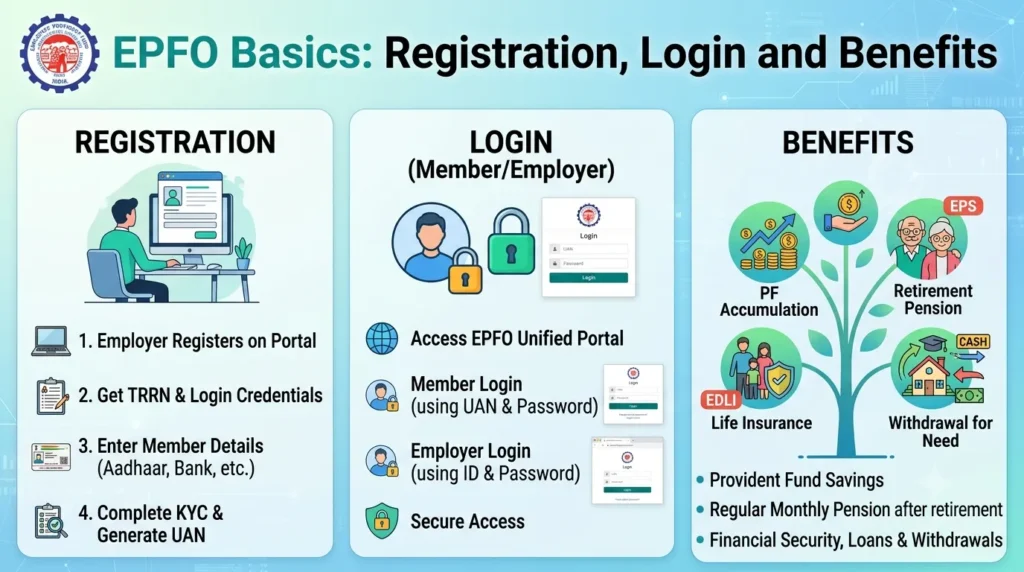
The Employees’ Provident Fund Organisation (EPFO) is one of India’s largest social security organizations, operating under the Ministry of Labour and Employment. It manages provident fund, pension, and insurance schemes for workers across the organized sector, ensuring financial security for millions of employees and their families. Understanding how to register, access your account, and maximize the benefits offered by EPFO is crucial for every salaried employee in India.
What is EPFO?
EPFO administers three main schemes: the Employees’ Provident Fund (EPF) Scheme, the Employees’ Pension Scheme (EPS), and the Employees’ Deposit Linked Insurance (EDLI) Scheme. These schemes collectively provide retirement benefits, pension security, and insurance coverage to employees working in establishments with 20 or more workers, though smaller organizations can also voluntarily register.
EPFO Registration Process
For employees joining an EPF-covered organization, registration is typically handled by the employer. However, understanding the process helps ensure your account is set up correctly.
For Employers:
Employers must register their establishment with EPFO if they employ 20 or more people. The registration is done through the Unified Portal by submitting necessary documents including PAN, business proof, bank details, and owner identification. Once approved, the employer receives an establishment code.
For Employees:
When you join an EPF-covered organization, your employer enrolls you in the scheme. You’ll need to provide your Aadhaar number, PAN, bank account details, and personal information. A unique Universal Account Number (UAN) is generated, which remains constant throughout your career, regardless of job changes.
EPFO Login and UAN Activation
The UAN portal (unifiedportal-mem.epfindia.gov.in) is your gateway to managing your EPF account. Here’s how to access it:
- Activate Your UAN: First-time users must activate their UAN by visiting the member portal and selecting “Activate UAN.” Enter your UAN, Aadhaar number, and other details to receive an OTP for verification.
- Set Your Password: After activation, create a strong password for future logins.
- Login Process: Use your UAN and password to access the portal. You can view your passbook, check balances, update KYC details, and request withdrawals or transfers.
The EPFO mobile app, “UMANG,” also provides convenient access to these services, allowing you to manage your account on the go.
Key Benefits of EPFO
1. Retirement Savings:
The EPF scheme ensures disciplined savings for retirement. Both employer and employee contribute 12% of the basic salary plus dearness allowance. The accumulated corpus, along with interest (currently 8.15% for 2022-23), provides substantial retirement funds.
2. Pension Benefits:
Under the EPS, a portion of the employer’s contribution (8.33% of salary, capped at ₹1,250) goes toward pension. Employees who have completed 10 years of service are eligible for monthly pension after reaching 58 years of age.
3. Insurance Coverage:
The EDLI scheme provides life insurance coverage to EPF members. In case of an employee’s death during service, their nominees receive a lump sum amount, currently up to ₹7 lakhs.
4. Tax Benefits:
Contributions to EPF qualify for tax deduction under Section 80C of the Income Tax Act, up to ₹1.5 lakhs annually. The interest earned and the withdrawal amount (after five years of continuous service) are also tax-exempt, making it an EEE (Exempt-Exempt-Exempt) investment.
5. Easy Portability:
The UAN system ensures your EPF account follows you across jobs. You don’t need to maintain multiple accounts or worry about transferring balances manually.
6. Partial Withdrawals:
Members can make partial withdrawals for specific purposes like medical emergencies, home purchase, education, or marriage, subject to certain conditions and service duration.
7. Online Services:
The EPFO portal offers paperless, hassle-free services including balance inquiry, claim submission, PF transfer, and KYC updates, eliminating the need for physical visits to EPFO offices.
Important Considerations
Keep your KYC details (Aadhaar, PAN, bank account) updated in the EPFO portal to ensure smooth processing of claims and transfers. Regularly check your passbook to verify that contributions are being credited correctly. If you change jobs, ensure your new employer links your existing UAN rather than creating a new account.
EPFO’s services have significantly improved with digitization, making it easier than ever to manage your retirement savings and access benefits. By understanding these basics and actively monitoring your account, you can ensure maximum advantage from this crucial social security scheme.
Frequently Asked Questions (FAQs)
1. What is a UAN and why is it important?
Universal Account Number (UAN) is a 12-digit unique number allotted to every EPF member. It remains constant throughout your career and links all your EPF accounts from different employers, ensuring seamless portability and consolidated account management.
2. Can I withdraw my EPF before retirement?
Yes, you can withdraw EPF in certain circumstances: full withdrawal after two months of unemployment, partial withdrawal for specific needs like medical treatment, home purchase, or education. However, withdrawals before five years of service may attract tax.
3. What happens to my EPF if I change jobs?
Your EPF account continues with the same UAN. You can transfer your previous EPF balance to your new employer’s account through the online portal by submitting a transfer claim, ensuring all your savings remain consolidated.
4. How is the EPF interest rate determined?
The EPFO’s Central Board of Trustees recommends the interest rate annually based on the organization’s income from investments. The rate is then approved by the Finance Ministry and credited to member accounts yearly.
5. What documents are needed for EPF claim settlement?
For most online claims, no physical documents are required if your Aadhaar and bank account are linked and verified. For offline claims, you may need Form 19 (for PF withdrawal), Form 10C (for pension withdrawal), cancelled cheque, and identity proof.